Assignment structure
During data transfer between ARIS and the SAP®Solution Manager, the mandatory hierarchical structure is created as defined in the default method configuration of the branch. The method configuration determines how database items are displayed in ARIS after they have been downloaded from SAP® branches or after SAP® synchronization. The ARIS administrator can customize the default method configuration for branches. This makes it possible to use different element types, for example, BPMNTM diagrams.
Hierarchy
The hierarchical structure of SAP® Solution Manager elements is structured in ARIS by means of the defined assignment structure. Structural elements are represented by SAP functions. The hierarchical structure is handled by functions with distinct SAP function type attributes, database subgroups, and models with related SAP model type attributes. The default symbol used for functions depends on the model type selected for the assignment. The SAP function type attribute of a function must match the SAP model type attribute of the assigned model. This model must only contain function occurrences of the next lower SAP function type. You can assign several models of the same type, such as EPC or Function allocation diagram, to a function. If you use BPMN diagrams, only one assigned BPMN diagram is allowed. The SAP model type attribute must be specified only for the one model relevant to synchronization, and the assignment structure must be consistent.
This allows you to create all assignments automatically.
By placing elements in an arbitrary nested folder structure, there can be as many levels as required. In ARIS SAP folders are handled by subgroups, functions with the Folder SAP function type attribute value, and models with the Folder SAP model type attribute value. You can use folders to structure scenarios, as well as the Process Step Library (PSL) and the Interface Library. Below the Business process structure, folders can only have scenarios or folders as subordinate elements. Superior elements can either be a folder or a root node. The same rules apply for the PSL. But since scenarios or processes are not available in the PSL, Process steps folders can only have process step originals as subordinate elements.
In ARIS, folders are handled like all other SAP structure elements branch, scenario, process and process step. For folder items, you can use the new Folder, Process steps folder, Executables folder, and Interface folder SAP function types and SAP model types.
Hierarchy | SAP model type/ SAP function type | Subordinate | Superior |
|---|---|---|---|
Branch | Project | Folder Process steps folder (PSL) Executable folder Interface folder | - |
Folder | Folder | Folder Scenario | Branch or folder |
Scenario | Scenario | Process | Folder |
Process | Process | Process step PSL Occurrence* | Scenario |
Process step | Process step | - | Process |
Process steps folder (PSL) | Process steps folder | Process step original (PSL) | Process steps folder (PSL) |
Process step original (PSL) | Process steps folder | - | Process steps folder (PSL) |
Executable folder | Executables folder | Executable folder | Executable folder |
Interface folder | Interface folder | Interface folder none** | Interface folder |
*In contrast to SAP, in ARIS you can use occurrences of process step originals as subordinate elements of processes.
**In contrast to SAP, interfaces in ARIS are not mapped as structural elements, but as assignments. This example shows how this SAP solution is mapped in ARIS.

The Development branch of the DEMO_ARIS Branch solution was downloaded to the SAP database subgroup. The top structure always starts with a root function of the Project SAP function type. This root function, as well as the subgroup containing the branch's content, always has the same name as the SAP project or branch.
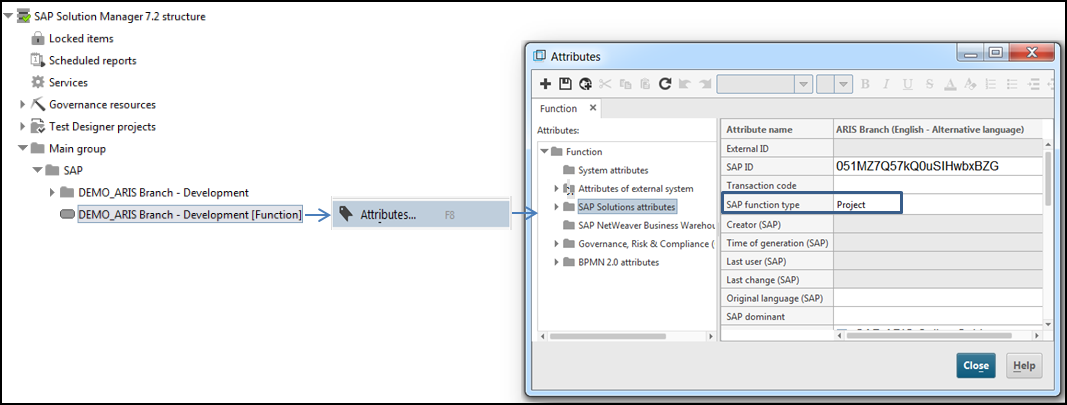
The subgroup stores the content in hierarchical levels.
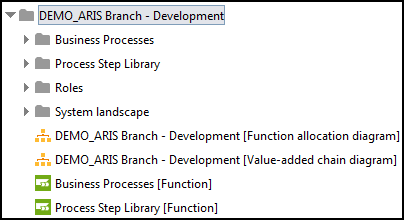
It contains the Business Process, Process Step Library, Roles, and System landscape subgroups.
By default, the hierarchical structure is mapped without using a method configuration as follows. If you want to use BPMN TM, for example, you must customize the method configuration accordingly.
SAP Solution Manager 7.2
Assignments will be included if the SAP ID, SAP function types, and SAP model types match between object definitions and assignments that have already been synchronized.
Assignments are also included if no SAP ID exists (that is, object definitions have not yet been synchronized), and if SAP function types and SAP model types match between object definitions and assignments. All assignments without an SAP function type or SAP ID will not be included.
If you have customized the method configuration for using BPMNTM, find out about the assignment structure that deviates from the default.
The PSL has a similar structure but uses different element types.
SAP® Solution Manager branches are represented in ARIS by start objects. Objects of the Function type are created automatically. You cannot change this setting. For the start objects, the Branch SAP function type attribute value is selected automatically. Models of the Branch SAP model type are assigned to the start objects.
By default, a model of the Value-added chain diagram (VACD) type and a model of the Function allocation diagram (FAD) type are automatically assigned to start objects. The assigned application systems are listed in the FAD. The business scenarios are displayed in the VACD. Depending on the model type, the symbols representing occurrences of business scenarios change. These project models of the Project SAP model type may only contain business scenarios. By default, business scenarios are represented as objects of the Scenario SAP function type with the SAP® value-added chain symbol. You can also select other model types instead of VACD and use user-defined function allocation diagrams.
By placing elements in an arbitrary nested folder structure, there can be as many levels as required. In ARIS SAP folders are handled by subgroups, functions with the Folder SAP function type attribute value, and models with the Folder SAP model type attribute value. You can use folders to structure scenarios, as well as the Process Step Library (PSL) and the Interface Library. Below the Business process structure, folders can only have scenarios or folders as subordinate elements. Superior elements can either be a folder or a root node. The same rules apply for the PSL. But since scenarios or processes are not available in the PSL, Process steps folders can only have process step originals as subordinate elements.