Prerequisites and rules for content filters
Prerequisites
 My content is only available if at least one database to which you have access is provided.
Content filters are only applied if they are activated.
The activated configuration/modification set contains correctly configured My content settings with which you can select filters.
Available filter criteria
In the filter criteria of My content, objects of the type Role, Location, and Application system type (System) are available for which you have read privileges in the selected database.
Information not filtered by content filters
When you open a diagram, all information is displayed unfiltered. You can also navigate using assignments. Regardless of content filters, assignments are filtered by the hierarchy in the views. In the Classic view, all assignments are shown, because all assigned models are stored in the group structure. In the Default view, only assignments are shown that belong to the current hierarchy, for example, assignments from an object of Value-added chain diagrams (VAC) to process models like EPCs, but no assignments to organizational charts.
Information filtered by content filters
Filtered according to the selected role:
All steps of the Steps fact sheet are displayed if you view processes step by step, but the detailed information about the satellites is filtered.
Tables
Fact sheets
RA(S)CI matrices
Search (except Enterprise Search)
Navigation (Groups or Processes)
Item-dependent filtering
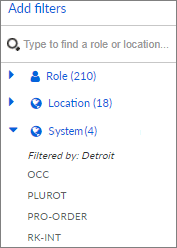
If the database is prepared, you can filter item-dependently. If you select a role or a location, the systems are filtered by either the role or the location. If you select a role and a location, the systems are filtered by both. Under System, item-dependent filtering is indicated by Filtered by.